
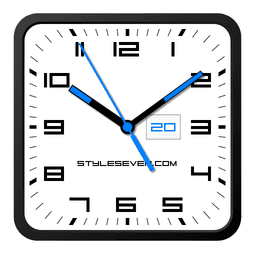
Tangkapan layar
Tentang Square Clock Android-7
Square Clock Android-7 adalah aplikasi jam analog yang sepenuhnya dapat disesuaikan yang memungkinkan Anda merancang penunjuk waktu yang sesuai dengan gaya Anda dan menyatu dengan mulus ke dalam estetika perangkat Anda.
Sesuaikan setiap elemen visual sesuai preferensi Anda. Pilih antara bentuk dial persegi atau bulat, pilih dari tema warna putih atau hitam, dan pilih warna sekunder kustom untuk teks dan jarum. Aplikasi ini menampilkan font persegi khas yang dibuat oleh pengembang, memberikan jam Anda tampilan yang unik. Apakah Anda lebih suka tampilan minimalis atau kontras yang berani, Anda mengontrol desain akhirnya.
Tetap terinformasi sekilas dengan tampilan informasi terintegrasi. Jam menunjukkan tanggal, bulan, hari dalam seminggu, dan pengisian baterai saat ini di slot khusus—semuanya dapat disesuaikan. Sembunyikan, ganti, atau atur ulang slot untuk fokus pada apa yang penting bagi Anda. Perlu tahu waktu tanpa tangan? Ketuk dua kali aplikasi atau aktifkan pengumuman suara berkala setiap 30 menit (atau interval pilihan Anda) untuk mendengar waktu saat ini diucapkan dengan lantang.
Pilih bagaimana jam cocok dengan alur kerja harian Anda. Gunakan sebagai overlay mengambang yang berada di atas semua jendela, memposisikan ulang dan mengubah ukurannya melalui drag-and-drop. Atur sebagai wallpaper hidup Anda dengan ukuran dan posisi yang dapat disesuaikan di layar beranda Anda. Tambahkan sebagai widget aplikasi—dukungan jarum detik tersedia di Android 12 dan yang lebih tinggi—dan ubah ukurannya menggunakan kontrol widget standar. Jalankan layar penuh dengan kemampuan layar-aktif untuk menjaga tampilan Anda tetap aktif, atau gunakan sebagai screensaver saat mengisi daya.
Nikmati mode tampilan khusus yang dirancang untuk kenyamanan dan umur panjang perangkat. Mode Jam Malam menampilkan latar belakang hitam yang tenang dan hemat baterai dengan jarum abu-abu gelap, sempurna untuk lingkungan cahaya rendah. Fitur Layar Selalu Aktif (diaktifkan secara manual dalam mode layar penuh) menjaga jam Anda tetap terlihat bahkan saat layar mati, dengan kontrol kecerahan dan opsi kunci otomatis untuk mengelola konsumsi baterai. Pergeseran posisi acak setiap menit melindungi dari burn-in layar pada layar OLED.
Fleksibilitas meluas ke setiap detail. Personalisasi latar belakang Anda dengan memilih gambar dari galeri Anda atau warna solid. Tampilkan atau sembunyikan jarum detik berdasarkan preferensi. Pilih teks abu-abu untuk estetika yang lebih lembut. Orientasi potret dan lanskap beradaptasi dengan sempurna, dengan dukungan penuh untuk semua resolusi layar—dari HD hingga 4K—tanpa kehilangan kualitas.
Square Clock Android-7 menghadirkan solusi jam analog berfitur lengkap yang beradaptasi dengan gaya hidup Anda, apakah Anda membutuhkan pendamping meja fungsional, wallpaper hidup yang stylish, atau jam malam yang hemat baterai.
Kelebihan & Kekurangan
Kelebihan
- Extensive customization options for dial, colors, fonts, and layout
- Multiple display modes including floating overlay, wallpaper, widget, and fullscreen
- Night Clock mode with battery-efficient dark design for low-light use
- Voice announcements let you hear the time hands-free at set intervals
Kekurangan
- Always-On Screen feature may reduce battery life on older devices
- Second hand widget support limited to Android 12 and higher
- Fullscreen mode requires manual screen-on activation, not automatic
- OLED screen burn-in protection relies on random position shifts, not guaranteed
Pertanyaan umum tentang Square Clock Android-7
Apakah Square Clock Android-7 aman untuk diunduh?
File Square Clock Android-7 di Unstore dipindai untuk mendeteksi malware pada 20 Mei 2026. Pemindaian tidak menemukan ancaman dan memberikan skor risiko 20/100 (makin rendah, makin aman).
Apa saja persyaratan sistem untuk Square Clock Android-7?
Square Clock Android-7 berjalan di Android. Aplikasi ini memerlukan Android 5.0 (Lollipop) atau yang lebih baru. Ukuran unduhannya 8.2 MB.
Apa versi terbaru Square Clock Android-7?
Versi terbaru Square Clock Android-7 di Unstore adalah 1.5. Terakhir diperbarui pada 27 Juli 2026.
Siapa pengembang Square Clock Android-7?
Square Clock Android-7 dikembangkan oleh Style-7.
Aplikasi Terkait

Microsoft PowerToys
Utilitas Windows dan alat produktivitas — tingkatkan alur kerja Anda dengan alat sistem, manajemen jendela, dan fitur pratinjau file.

Windows Essentials 2012
Email, pesan, pengeditan foto, pembuatan video, dan penyimpanan cloud—Windows Essentials 2012 mencakup semua alat produktivitas yang Anda butuhkan.

Free Download Manager
Manajer unduhan yang mempercepat transfer, mengatur file berdasarkan jenis, dan menyinkronkan dengan Firefox dan Chrome.

HWiNFO
Pemantauan perangkat keras untuk Windows—lacak suhu CPU, beban GPU, kecepatan kipas, voltase secara real-time.

TransMac
Baca drive Mac dan file DMG di Windows. Akses penyimpanan APFS/HFS+ dan buat image disk.

TestDisk & PhotoRec
Pulihkan file yang hilang dan perbaiki partisi disk — alat pemulihan data open-source gratis untuk Windows.
Artikel terbaru

Pengonversi angka Romawi gratis online: instan, tanpa daftar, bekerja di ponsel Anda
Oct 6, 2026

Papan tulis online gratis seperti Jamboard: gunakan Quickboard di browser Anda, tanpa pendaftaran
Oct 6, 2026

Mainkan permainan Color Ball Sort Puzzle gratis di browser (tanpa unduhan)
Oct 6, 2026

Mainkan kart racer gaya Beach Buggy Racing gratis di browser (tanpa unduhan)
Oct 6, 2026

Mainkan game bergaya Alto's Adventure gratis di browser (tanpa unduhan)
Oct 6, 2026